
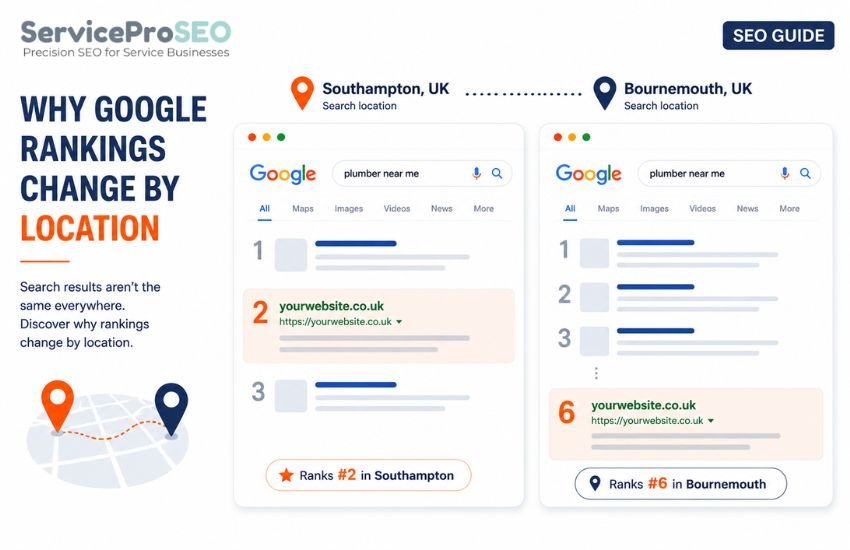
Can You Check Google Rankings From Another Location?
Yes. Google search results can vary according to where a search is made, so the results you see when you search from your own desk aren’t necessarily the results a customer in another town or city would see. If you want to know how a website ranks for someone searching in Southampton, Winchester, or anywhere else, you need a way to run that search using that location rather than your own, without physically travelling there.
This guide focuses on checking Google’s organic search results. If you want to measure where a business appears in local map results, see How to Check Your Google Maps Ranking.
How to Check Your Ranking From a Specific Location
To check a ranking position from a location other than your own, you specify three things before running the search:
- The keyword — the exact search query you want to check (for example, "SEO agency")
- The location — the town, city, or postcode you want to search from
- The device — desktop or mobile, since results can differ between the two
A local rank checker lets you enter these details and runs the search using that location and device, rather than your own.
This checks a single point in time. It returns the top 10 organic results and their ranking positions. It also shows the ranking URL. That means you can see exactly which page Google is returning for the query, not just whether a domain appears.
For example, entering “SEO agency” with Southampton selected as the location and desktop as the device will show the organic results and ranking positions for that exact search context.
Choose the Location You Want to Check
You can check a supported location rather than relying on the location of your own device. Depending on the locations available, this may include a town, city or postcode.
For a business serving several areas, check each location separately. For example, you could run the same search from Southampton, Winchester and Eastleigh while keeping the keyword, device and search type unchanged.
Check Mobile or Desktop Results
Once the location is set, choose whether to check desktop or mobile results. Google doesn’t always return identical result sets for the same keyword and location across both — the ranking position, and sometimes the results themselves, can differ.
If most of your customers search on mobile, checking mobile results will give you a closer picture of what they see; if you’re more interested in desktop visibility, check that instead. Where it matters, it’s worth checking both.
Compare the Same Keyword Across Different Locations
Once you’ve checked a ranking position for one location, you can repeat the process for another to compare results side by side. Using the earlier example: run “SEO agency” from Southampton, note the ranking position and organic result, then run the same keyword and device from Winchester.
- Southampton → "SEO agency" → Organic → Desktop
- Winchester → "SEO agency" → Organic → Desktop
Comparing the two shows whether a website holds a consistent ranking position across locations, or whether its visibility changes from one town to the next.
Compare the Same Keyword Across Different Locations
When comparing locations, change only the location. Keep the keyword, device and search type the same. This gives you a like-for-like comparison between locations, rather than a comparison distorted by different settings.
Why Your Own Google Search May Look Different
If you search Google yourself, the results reflect your own location, device and search context. They may not match the results returned when the same query is checked from another location.
Setting the location directly gives you a consistent way to check and compare results without relying on searches made from your own device. Learn more: Why Google Rankings Change by Location.
Check a Google Ranking From Another Location
ServiceProSEO’s Local Rank Checker lets you check Google’s organic results using a supported UK or US location rather than relying on the location of your own device.
Enter your keyword, choose a location and select desktop or mobile. The checker returns the top 10 results for those search settings, including the ranking URL, so you can see both the position and the page Google returns.
Your first 3 checks are free. There’s no sign-up or subscription required. If you need more, you can buy credits and use them whenever you like.